 AI项目博客
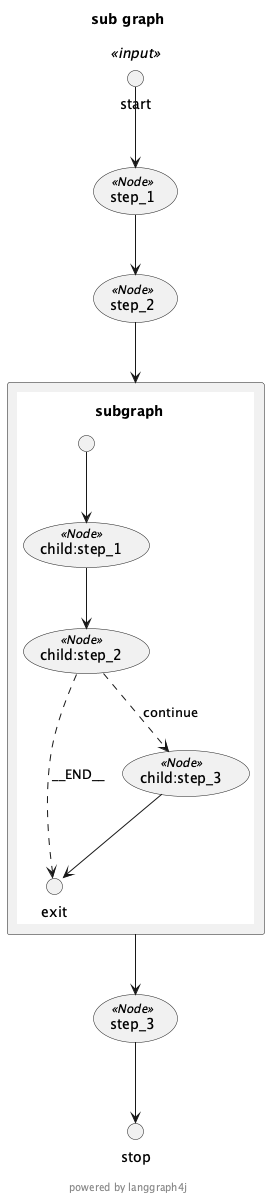
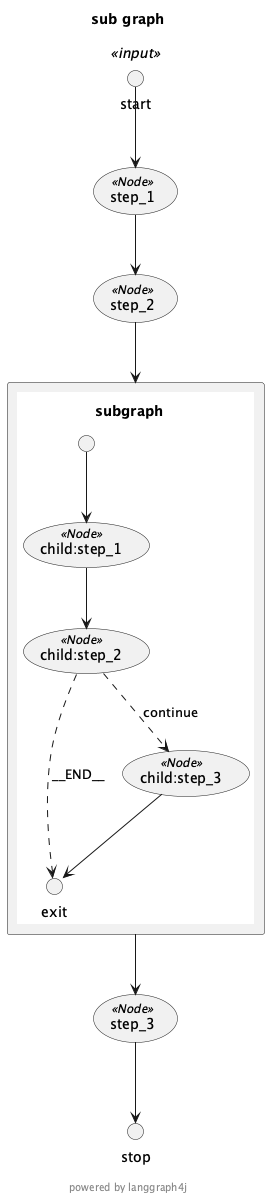
Spring AI Alibaba Graph 支持将工作流导出为 PlantUML 格式,方便可视化和文档化。
import net.sourceforge.plantuml.SourceStringReader;
import net.sourceforge.plantuml.FileFormatOption;
import net.sourceforge.plantuml.FileFormat;
import com.alibaba.cloud.ai.graph.GraphRepresentation;
import java.io.IOException;

static java.awt.Image plantUML2PNG(String code) throws IOException {
  var reader = new SourceStringReader(code);

  try (var imageOutStream = new java.io.ByteArrayOutputStream()) {
      var description = reader.outputImage(imageOutStream, 0, new FileFormatOption(FileFormat.PNG));
      var imageInStream = new java.io.ByteArrayInputStream(imageOutStream.toByteArray());
      return javax.imageio.ImageIO.read(imageInStream);
  }
}

// 从 GraphRepresentation 生成图像
static void displayDiagram(GraphRepresentation representation) throws IOException {
  var image = plantUML2PNG(representation.getContent());
  display(image);
}
var code = """
@startuml
title Spring AI Alibaba Graph
START --> NodeA
NodeA --> NodeB
NodeB --> END
@enduml
""";
display(plantUML2PNG(code));import com.alibaba.cloud.ai.graph.CompiledGraph;
import com.alibaba.cloud.ai.graph.GraphRepresentation;
import com.alibaba.cloud.ai.graph.KeyStrategy;
import com.alibaba.cloud.ai.graph.KeyStrategyFactory;
import com.alibaba.cloud.ai.graph.StateGraph;
import com.alibaba.cloud.ai.graph.exception.GraphStateException;
import com.alibaba.cloud.ai.graph.state.strategy.ReplaceStrategy;
import java.util.HashMap;
import java.util.Map;
import static com.alibaba.cloud.ai.graph.StateGraph.END;
import static com.alibaba.cloud.ai.graph.StateGraph.START;
import static com.alibaba.cloud.ai.graph.action.AsyncNodeAction.node_async;
/**
* 从 Graph 生成 PlantUML
*/
public static void generatePlantUmlFromGraph() throws GraphStateException {
KeyStrategyFactory keyStrategyFactory = () -> {
HashMap<String, KeyStrategy> strategies = new HashMap<>();
strategies.put("result", new ReplaceStrategy());
return strategies;
};
// 构建一个简单的 Graph
StateGraph graph = new StateGraph(keyStrategyFactory)
.addNode("step1", node_async(state -> Map.of("result", "Step 1")))
.addNode("step2", node_async(state -> Map.of("result", "Step 2")))
.addNode("step3", node_async(state -> Map.of("result", "Step 3")))
.addEdge(START, "step1")
.addEdge("step1", "step2")
.addEdge("step2", "step3")
.addEdge("step3", END);
CompiledGraph compiledGraph = graph.compile();
// 生成 PlantUML 表示
GraphRepresentation representation = compiledGraph.getGraph(
GraphRepresentation.Type.PLANTUML,
"My Workflow"
);
// 显示 PlantUML 代码
System.out.println("PlantUML representation:");
System.out.println(representation.content());
}@startuml
title My Workflow
START --> step1
step1 --> step2
step2 --> step3
step3 --> END
@enduml- 文档生成: 自动生成工作流文档
- 调试分析: 可视化理解 Graph 结构
- 团队协作: 分享工作流设计
- 版本对比: 比较不同版本的 Graph 结构
- 快速入门 – Graph 基础使用
- PlantUML 官方文档 – PlantUML 语法参考
本文整理自 Spring AI Alibaba 官方文档《PlantUML 图表可视化》:https://java2ai.com/docs/frameworks/graph-core/examples/plantuml