 AI项目博客
Tool 执行是使用提供的输入参数调用 tool 并返回结果的过程。Tool 执行由 ToolCallingManager 接口处理,该接口负责管理 tool 执行生命周期。
public interface ToolCallingManager {

  /**
   * Resolve the tool definitions from the model's tool calling options.
   */
  List<ToolDefinition> resolveToolDefinitions(ToolCallingChatOptions chatOptions);

  /**
   * Execute the tool calls requested by the model.
   */
  ToolExecutionResult executeToolCalls(Prompt prompt, ChatResponse chatResponse);

}
如果您使用任何 Spring AI Spring Boot Starters,DefaultToolCallingManager 是 ToolCallingManager 接口的自动配置实现。您可以通过提供自己的 ToolCallingManager bean 来自定义 tool 执行行为。
@Bean
ToolCallingManager toolCallingManager() {
  return ToolCallingManager.builder().build();
}
默认情况下,Spring AI 在每个 ChatModel 实现内部透明地为您管理 tool 执行生命周期。但您可以选择退出此行为并自己控制 tool 执行。本节描述这两种场景。
框架控制的 Tool 执行
使用默认行为时,Spring AI 将自动拦截来自 model 的任何 tool call 请求,调用 tool 并将结果返回给 model。所有这些都由每个使用 ToolCallingManager 的 ChatModel 实现透明地为您完成。
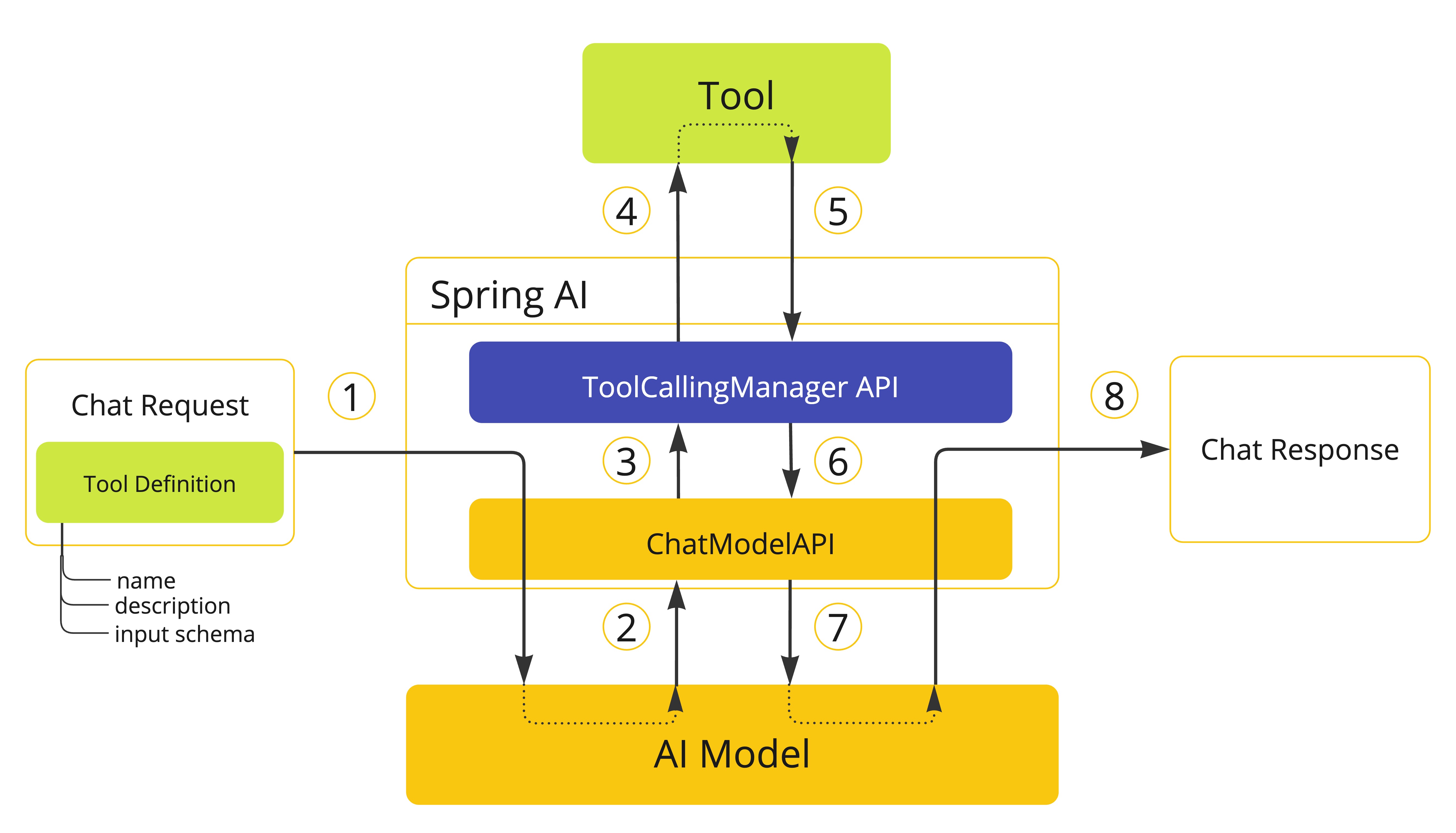
- 当我们想要使 tool 可用于 model 时,我们在聊天请求(Prompt)中包含其定义,并调用将请求发送到 AI model 的 ChatModel API。
- 当 model 决定调用 tool 时,它发送带有 tool 名称和根据定义 schema 建模的输入参数的响应(ChatResponse)。
- ChatModel 将 tool call 请求发送到 ToolCallingManager API。
- ToolCallingManager 负责识别要调用的 tool 并使用提供的输入参数执行它。
- Tool call 的结果返回到 ToolCallingManager。
- ToolCallingManager 将 tool 执行结果返回给 ChatModel。
- ChatModel 将 tool 执行结果发送回 AI model(ToolResponseMessage)。
- AI model 使用 tool call 结果作为附加上下文生成最终响应,并通过 ChatClient 将其发送回调用者(ChatResponse)。
WARNING: 目前,与 model 交换的关于 tool 执行的内部消息不会暴露给用户。如果您需要访问这些消息,应该使用用户控制的 tool 执行方法。
确定 tool call 是否有资格执行的逻辑由 ToolExecutionEligibilityPredicate 接口处理。默认情况下,tool 执行资格通过检查 ToolCallingChatOptions 的 internalToolExecutionEnabled 属性是否设置为 true(默认值),以及 ChatResponse 是否包含任何 tool calls 来确定。
您可以在创建 ChatModel bean 时提供 ToolExecutionEligibilityPredicate 的自定义实现。
用户控制的 Tool 执行
在某些情况下,您可能希望自己控制 tool 执行生命周期。您可以通过将 ToolCallingChatOptions 的 internalToolExecutionEnabled 属性设置为 false 来执行此操作。
当您使用此选项调用 ChatModel 时,tool 执行将委托给调用者,让您完全控制 tool 执行生命周期。您有责任检查 ChatResponse 中的 tool calls 并使用 ToolCallingManager 执行它们。
以下示例演示了用户控制的 tool 执行方法的最小实现:
ChatModel chatModel = ...;
ToolCallingManager toolCallingManager = ToolCallingManager.builder().build();

ChatOptions chatOptions = ToolCallingChatOptions.builder()
  .toolCallbacks(new CustomerTools())
  .internalToolExecutionEnabled(false)
  .build();
Prompt prompt = new Prompt("Tell me more about the customer with ID 42", chatOptions);

ChatResponse chatResponse = chatModel.call(prompt);

while (chatResponse.hasToolCalls()) {
  ToolExecutionResult toolExecutionResult = toolCallingManager.executeToolCalls(prompt, chatResponse);

  prompt = new Prompt(toolExecutionResult.conversationHistory(), chatOptions);

  chatResponse = chatModel.call(prompt);
}

System.out.println(chatResponse.getResult().getOutput().getText());
NOTE: 选择用户控制的 tool 执行方法时,我们建议使用 ToolCallingManager 来管理 tool calling 操作。这样,您可以受益于 Spring AI 为 tool 执行提供的内置支持。但是,没有什么可以阻止您实现自己的 tool 执行逻辑。
异常处理
当 tool call 失败时,异常作为 ToolExecutionException 传播,可以捕获以处理错误。ToolExecutionExceptionProcessor 可用于处理 ToolExecutionException,有两种结果:要么生成要发送回 AI model 的错误消息,要么抛出异常供调用者处理。
@FunctionalInterface
public interface ToolExecutionExceptionProcessor {

  /**
   * Convert an exception thrown by a tool to a String that can be sent back to the AI
   * model or throw an exception to be handled by the caller.
   */
  String process(ToolExecutionException exception);

}
如果您使用任何 Spring AI Spring Boot Starters,DefaultToolExecutionExceptionProcessor 是 ToolExecutionExceptionProcessor 接口的自动配置实现。默认情况下,RuntimeException 的错误消息会发送回 model,而检查异常和错误(例如,IOException、OutOfMemoryError)总是被抛出。DefaultToolExecutionExceptionProcessor 构造函数允许您将 alwaysThrow 属性设置为 true 或 false。如果为 true,将抛出异常而不是将错误消息发送回 model。
您可以使用 spring.ai.tools.throw-exception-on-error 属性来控制 DefaultToolExecutionExceptionProcessor bean 的行为:
| 属性 | 描述 | 默认值 |
|---|---|---|
| spring.ai.tools.throw-exception-on-error | 如果为 true,tool calling 错误将作为异常抛出供调用者处理。如果为 false,错误将转换为消息并发送回 AI model,允许它处理并响应错误。 | false |
@Bean
ToolExecutionExceptionProcessor toolExecutionExceptionProcessor() {
  return new DefaultToolExecutionExceptionProcessor(true);
}
NOTE: 如果您定义了自己的 ToolCallback 实现,请确保在 call() 方法中作为 tool 执行逻辑的一部分发生错误时抛出 ToolExecutionException。
ToolExecutionExceptionProcessor 由默认 ToolCallingManager(DefaultToolCallingManager)内部使用,以处理 tool 执行期间的异常。
向 model 传递 tools 的主要方法是在调用 ChatClient 或 ChatModel 时提供 ToolCallback(s),使用前面描述的策略之一。
但是,Spring AI 还支持使用 ToolCallbackResolver 接口在运行时动态解析 tools。
public interface ToolCallbackResolver {

  /**
   * Resolve the {@link ToolCallback} for the given tool name.
   */
  @Nullable
  ToolCallback resolve(String toolName);

}
使用此方法时:
- 在客户端,您向 ChatClient 或 ChatModel 提供 tool 名称,而不是 ToolCallback(s)。
- 在服务器端,ToolCallbackResolver 实现负责将 tool 名称解析为相应的 ToolCallback 实例。
默认情况下,Spring AI 依赖于 DelegatingToolCallbackResolver,它将 tool 解析委托给 ToolCallbackResolver 实例列表:
- SpringBeanToolCallbackResolver 从类型为 Function、Supplier、Consumer 或 BiFunction 的 Spring bean 解析 tools。
- StaticToolCallbackResolver 从 ToolCallback 实例的静态列表解析 tools。使用 Spring Boot 自动配置时,此解析器会自动配置应用程序上下文中定义的所有类型为 ToolCallback 的 bean。
如果您依赖 Spring Boot 自动配置,可以通过提供自定义 ToolCallbackResolver bean 来自定义解析逻辑。
@Bean
ToolCallbackResolver toolCallbackResolver(List<ToolCallback> toolCallbacks) {
  StaticToolCallbackResolver staticToolCallbackResolver = new StaticToolCallbackResolver(toolCallbacks);
  return new DelegatingToolCallbackResolver(List.of(staticToolCallbackResolver));
}
ToolCallbackResolver 由 ToolCallingManager 内部使用,以在运行时动态解析 tools,支持框架控制的 Tool 执行和用户控制的 Tool 执行。
Tool calling 包括可观测性支持,使用 spring.ai.tool 观察来测量完成时间并传播跟踪信息。请参阅 Tool Calling 可观测性。
可选地,Spring AI 可以将 tool call 参数和结果导出为 span 属性,默认情况下出于敏感性原因禁用。详细信息:Tool Call 参数和结果数据。
日志记录
Tool calling 功能的所有主要操作都在 DEBUG 级别记录。您可以通过将 org.springframework.ai 包的日志级别设置为 DEBUG 来启用日志记录。
自定义工具属性
自定义工具名称
默认情况下,工具名称来自函数名称。当你需要更具描述性的内容时,可以覆盖它:
ToolCallback searchTool = FunctionToolCallback
  .builder("web_search", new SearchFunction())  // 自定义名称
  .description("Search the web for information")
  .inputType(String.class)
  .build();

System.out.println(searchTool.getName());  // web_search
// 推荐:使用 ToolDefinition 提取名称
System.out.println(searchTool.getToolDefinition().name());  // web_search
自定义工具描述
覆盖自动生成的工具描述以提供更清晰的模型指导:
ToolCallback calculatorTool = FunctionToolCallback
  .builder("calculator", new CalculatorFunction())
  .description("Performs arithmetic calculations. Use this for any math problems.")
  .inputType(String.class)
  .build();
高级模式定义
使用 Java 类或 JSON schemas 定义复杂的输入:
使用 Java 记录类(Record):
import org.springframework.ai.tool.annotation.ToolParam;

public record WeatherInput(
  @ToolParam(description = "City name or coordinates") String location,
  @ToolParam(description = "Temperature unit preference") Unit units,
  @ToolParam(description = "Include 5-day forecast") boolean includeForecast
) {}

public enum Unit { CELSIUS, FAHRENHEIT }

public class WeatherFunction implements Function<WeatherInput, String> {
  @Override
  public String apply(WeatherInput input) {
      double temp = input.units() == Unit.CELSIUS ? 22 : 72;
      String result = String.format(
          "Current weather in %s: %.0f degrees %s",
          input.location(),
          temp,
          input.units().toString().substring(0, 1).toUpperCase()
      );

      if (input.includeForecast()) {
          result += "
Next 5 days: Sunny";
      }

      return result;
  }
}

ToolCallback weatherTool = FunctionToolCallback
  .builder("get_weather", new WeatherFunction())
  .description("Get current weather and optional forecast")
  .inputType(WeatherInput.class)
  .build();
本文整理自 Spring AI Alibaba 官方文档《Tools 工具》:https://java2ai.com/docs/frameworks/agent-framework/tutorials/tools