 AI项目博客
您可能想要定义一个具有完全不同 schema 的子图。在这种情况下,您可以创建一个调用子图的节点函数。此函数需要在调用子图之前将输入(父)状态转换为子图状态,并在从节点返回状态更新之前将结果转换回父状态。
注意事项
- 中断支持由您自己实现
示例:不同状态的子图
import com.alibaba.cloud.ai.graph.CompiledGraph;
import com.alibaba.cloud.ai.graph.KeyStrategy;
import com.alibaba.cloud.ai.graph.KeyStrategyFactory;
import com.alibaba.cloud.ai.graph.OverAllState;
import com.alibaba.cloud.ai.graph.StateGraph;
import com.alibaba.cloud.ai.graph.action.NodeAction;
import com.alibaba.cloud.ai.graph.state.strategy.ReplaceStrategy;

import java.util.HashMap;
import java.util.Map;

import static com.alibaba.cloud.ai.graph.StateGraph.END;
import static com.alibaba.cloud.ai.graph.StateGraph.START;
import static com.alibaba.cloud.ai.graph.action.AsyncNodeAction.node_async;

// 父图状态
KeyStrategyFactory parentKeyStrategyFactory = () -> {
  HashMap<String, KeyStrategy> keyStrategyHashMap = new HashMap<>();
  keyStrategyHashMap.put("parentData", new ReplaceStrategy());
  keyStrategyHashMap.put("processedResult", new ReplaceStrategy());
  return keyStrategyHashMap;
};

// 子图状态(完全不同)
KeyStrategyFactory childKeyStrategyFactory = () -> {
  HashMap<String, KeyStrategy> keyStrategyHashMap = new HashMap<>();
  keyStrategyHashMap.put("childInput", new ReplaceStrategy());
  keyStrategyHashMap.put("childOutput", new ReplaceStrategy());
  return keyStrategyHashMap;
};

// 创建子图
StateGraph childGraph = new StateGraph(childKeyStrategyFactory)
      .addNode("processor", node_async(state -> {
          String input = (String) state.value("childInput").orElse("");
          String output = "Processed: " + input;
          return Map.of("childOutput", output);
      }))
      .addEdge(START, "processor")
      .addEdge("processor", END);

CompiledGraph compiledChild = childGraph.compile();

// 将子图包装为 NodeAction
public static class CompiledSubGraphNode implements NodeAction {
  private final CompiledGraph compiledGraph;

  public CompiledSubGraphNode(CompiledGraph compiledGraph) {
      this.compiledGraph = compiledGraph;
  }

  @Override
  public Map<String, Object> apply(OverAllState state) {
      // 从父状态提取输入
      String input = (String) state.value("parentData").orElse("");

      // 执行编译好的子图
      Map<String, Object> subInput = Map.of("childInput", input);
      OverAllState subResult = compiledGraph.invoke(subInput).orElseThrow();

      // 提取子图输出
      String output = (String) subResult.value("childOutput").orElse("");
      return Map.of("processedResult", output);
  }
}

// 创建父图
CompiledSubGraphNode subGraphNode = new CompiledSubGraphNode(compiledChild);

StateGraph parentGraph = new StateGraph(parentKeyStrategyFactory)
      .addNode("call_child_with_transform", node_async(subGraphNode))
      .addEdge(START, "call_child_with_transform")
      .addEdge("call_child_with_transform", END);

CompiledGraph compiledParent = parentGraph.compile();
示例:可配置的子图节点
您可以创建一个可配置的子图节点,允许自定义输入和输出键:
public static class ConfigurableSubGraphNode implements NodeAction {
  private final CompiledGraph subGraph;
  private final String inputKey;
  private final String outputKey;

  public ConfigurableSubGraphNode(
          CompiledGraph subGraph,
          String inputKey,
          String outputKey
  ) {
      this.subGraph = subGraph;
      this.inputKey = inputKey;
      this.outputKey = outputKey;
  }

  @Override
  public Map<String, Object> apply(OverAllState state) {
      // 从父状态读取指定键的数据
      Object input = state.value(inputKey).orElse(null);

      // 执行子图
      OverAllState subResult = subGraph.invoke(Map.of("input", input)).orElseThrow();

      // 将结果写入指定键
      Object output = subResult.value("result").orElse(null);
      return Map.of(outputKey, output);
  }
}

// 使用可配置的子图节点
ConfigurableSubGraphNode configurableNode = new ConfigurableSubGraphNode(
      compiledSubGraph,
      "data",      // 从父状态的 "data" 键读取
      "processed"  // 将结果写入父状态的 "processed" 键
);
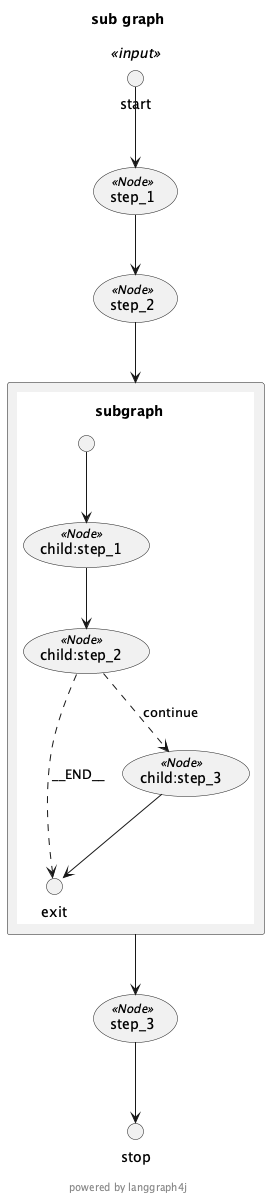
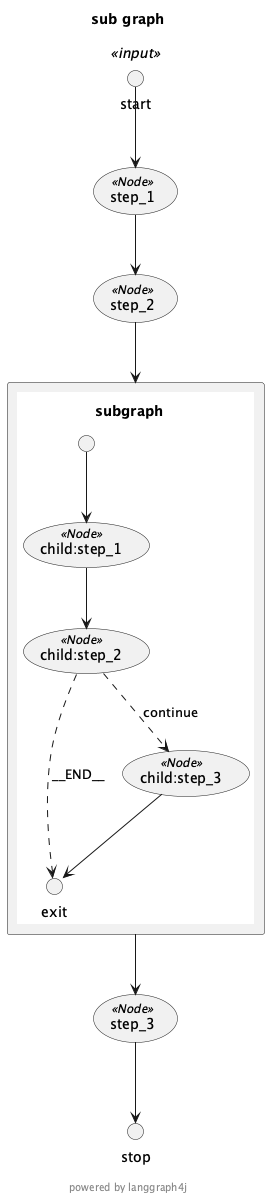
能够可视化图是很重要的,特别是当它们变得更加复杂时。Spring AI Alibaba Graph 提供了 StateGraph.getGraph() 方法来获取可视化格式(即图即代码表示,如 PlantUML):
import com.alibaba.cloud.ai.graph.GraphRepresentation;

StateGraph stateGraph = new StateGraph(keyStrategyFactory)
  .addNode("node1", node1)
  .addNode("node2", node2)
  .addEdge(START, "node1")
  .addEdge("node1", "node2")
  .addEdge("node2", END);

// 获取 PlantUML 表示
GraphRepresentation representation = stateGraph.getGraph(
  GraphRepresentation.Type.PLANTUML,
  "My Graph"
);

System.out.println(representation.content());
在添加编译的子图时,流式处理会自动启用。您可以通过 stream() 方法获取子图的流式输出:
import com.alibaba.cloud.ai.graph.CompiledGraph;
import reactor.core.publisher.Flux;

// 执行子图并获取流式输出
Flux<?> stream = compiledSubGraph.stream(Map.of("input", "test"));

// 处理流式输出
stream.subscribe(
      step -> System.out.println("Subgraph step: " + step),
      error -> System.err.println("Error: " + error.getMessage()),
      () -> System.out.println("Stream completed")
);
本文整理自 Spring AI Alibaba 官方文档《子图》:https://java2ai.com/docs/frameworks/graph-core/examples/subgraph