 AI项目博客
提示词是操作大模型的接口。字符串拼接也能拼出提示词,但变量一多就难读、难维护、容易拼错;正式项目需要模板化。LangChain 1.x 的 ChatPromptTemplate 输出的不是一段字符串,而是可直接交给聊天模型的消息列表。
16.1 为什么推荐提示词模板
先看字符串拼接:
topic = "Python"
difficulty = "初学者"

prompt_str = f"你是一个{difficulty}级别的编程导师。请用简单易懂的语言解释{topic}。"
response = model.invoke(prompt_str)
print(f"AI 回复:{response.content}")
优点是简单直接、上手快,适合临时 demo;缺点是变量多时可读性差、修改容易出错、没有变量校验,也难以支持多轮对话、RAG、Few-shot 等复杂场景。
换成 PromptTemplate:
from langchain.prompts import PromptTemplate

topic = "Python"
difficulty = "初学者"

template = PromptTemplate.from_template(
    "你是一个{difficulty}级别的编程导师。请用简单易懂的语言解释{topic}。"
)
prompt = template.format(difficulty=difficulty, topic=topic)
response = model.invoke(prompt)
模板的结构清晰、变量占位明确、可复用、能自动校验变量,也更容易接入 LangChain 的调试和追踪。代价是有一定学习成本,对极简单场景显得偏重。
开发建议:小项目或临时脚本用字符串拼接;正式开发、AI 应用用提示词模板。
16.2 提示词机制演进
旧时代:LLM + PromptTemplate。模型接口对应早期的 LLM 类,面向文本补全模型:输入一个字符串,模型续写文本。PromptTemplate 的职责是接收变量、渲染模板、输出一个完整字符串。
from langchain.prompts import PromptTemplate

prompt_template = PromptTemplate.from_template("请给我一个关于{topic}的{type}解释。")
prompt = prompt_template.format(type="详细", topic="量子力学")
print(prompt)
这时如果要模拟多轮聊天,只能在字符串里手动拼接角色,例如 "Human:你好\nAI:你好!有什么我能帮忙的吗?\nHuman:..."。结构混乱,模型也容易混淆对话边界。
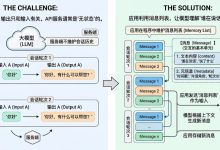
新时代:ChatModel + ChatPromptTemplate。现代聊天模型原生支持角色概念,输入是结构化的消息列表。ChatPromptTemplate 接收变量,输出 List[BaseMessage],可以直接交给聊天模型。
from langchain_core.prompts import ChatPromptTemplate

prompt_template = ChatPromptTemplate([
    ("system", "你是一个AI开发工程师. 你的名字是 {name}."),
    ("human", "{user_input}"),
])
prompt = prompt_template.invoke({"name": "小谷AI", "user_input": "你能帮我做什么?"})
print(prompt)| 特性 | PromptTemplate | ChatPromptTemplate |
|---|---|---|
| 输出格式 | 纯文本字符串 | 消息列表 |
| 角色支持 | 无 | system / user / assistant |
| 对话历史 | 不支持 | 支持 |
| 适用场景 | 简单提示 | 聊天、对话、多轮交互 |
ChatPromptTemplate 中常见的角色字符串:
| 角色字符串 | 含义 | 用途 |
|---|---|---|
| “system” | 系统消息 | 设定 AI 的行为、角色、规则 |
| “user” / “human” | 用户消息 | 用户的输入或问题 |
| “assistant” / “ai” | AI 消息 | AI 的回复,用于对话历史 |
16.3 ChatPromptTemplate 的使用
16.3.1 两种实例化方式
方式 1(推荐):from_messages()。传入由元组构成的列表,每个元组代表一条带角色的消息。
from langchain_core.prompts import ChatPromptTemplate

chat_template = ChatPromptTemplate.from_messages([
    ("system", "你是一个有帮助的AI机器人,你的名字是{name}。"),
    ("human", "你好,最近怎么样?"),
    ("ai", "我很好,谢谢!"),
    ("human", "{user_input}"),
])
prompt = chat_template.invoke({"name": "小明", "user_input": "你叫什么名字?"})
print(prompt)
方式 2:使用实例初始化方法。直接把消息列表传给构造函数,底层与 from_messages() 等价。
prompt_template = ChatPromptTemplate([
    ("system", "你是一个AI开发工程师. 你的名字是 {name}."),
    ("human", "你能开发哪些AI应用?"),
    ("ai", "我能开发很多AI应用, 比如聊天机器人, 图像识别, 自然语言处理等."),
    ("human", "{user_input}"),
])
prompt = prompt_template.invoke({"name": "小谷AI", "user_input": "你能帮我做什么?"})
print(prompt)
16.3.2 模板调用的三种方式
方式 1:invoke()。返回 ChatPromptValue 对象,里面是消息列表,可以直接交给模型。
prompt = prompt_template.invoke({"name": "小谷AI", "user_input": "你能帮我做什么?"})
print(type(prompt))        # ChatPromptValue
print(prompt)
print(len(prompt.messages))
方式 2:format()。返回格式化后的字符串,适合打印或传给只接受字符串的接口。
prompt = prompt_template.format(name="小谷AI", user_input="你能帮我做什么?")
print(type(prompt))  # str
print(prompt)
# System: 你是一个AI开发工程师. 你的名字是 小谷AI.
# Human: 你能开发哪些AI应用?
# AI: 我能开发很多AI应用...
# Human: 你能帮我做什么?
方式 3:format_messages()。直接返回消息列表。
prompt = prompt_template.format_messages(name="小谷AI", user_input="你能帮我做什么?")
print(type(prompt))  # list
print(prompt)
16.3.3 结合 LLM 调用
from dotenv import load_dotenv
from langchain_core.prompts import ChatPromptTemplate
from langchain.chat_models import init_chat_model
import os

load_dotenv(override=True)
model = init_chat_model(
    model="gpt-5.4-mini",
    model_provider="openai",
    api_key=os.getenv("CLOSEAI_API_KEY"),
    base_url=os.getenv("CLOSEAI_BASE_URL"),
)

chat_prompt = ChatPromptTemplate.from_messages([
    ("system", "你是一个数学家,你可以计算任何算式"),
    ("human", "{text}"),
])
prompt_value = chat_prompt.invoke({
    "text": "我今年18岁,我的舅舅今年38岁,我的爷爷今年72岁,我和舅舅一共多少岁了?"
})
output = model.invoke(prompt_value)
print(output.content)  # 18 + 38 = 56 岁
16.3.4 六种参数类型
ChatPromptTemplate 的参数是列表,列表元素可以是以下多种类型:
类型 1:str 列表。默认角色都是 human,不推荐,因为无法区分角色。
chat_template = ChatPromptTemplate.from_messages(["Hello, {name}!"])
messages = chat_template.invoke({"name": "小谷AI"})
# [HumanMessage(content='Hello, 小谷AI!')]
类型 2:tuple 列表。最常用,格式为 (role, content)。
prompt = ChatPromptTemplate.from_messages([
    ("system", "你的名字是{role}."),
    ("human", "很高兴认识你"),
])
print(prompt.invoke({"role": "小智"}))
类型 3:dict 列表。用 role/content 字典描述消息。
prompt = ChatPromptTemplate.from_messages([
    {"role": "system", "content": "你的名字是{role}."},
    {"role": "human", "content": "很高兴认识你"},
])
print(prompt.invoke({"role": "小智"}))
类型 4:Message 列表。直接传入已经实例化的 SystemMessage、HumanMessage 等。
from langchain_core.messages import SystemMessage, HumanMessage

chat_prompt_template = ChatPromptTemplate.from_messages([
    SystemMessage(content="我是一个贴心的智能助手"),
    HumanMessage(content="我的问题是:人工智能英文怎么说?"),
])
messages = chat_prompt_template.invoke({})
注意:Message 对象里不能有占位符。下面这种写法不会替换 {word}:
# 错误:占位符不会被渲染
HumanMessage(content="我的问题是:{word}英文怎么说?")

# 正确:需要变量时改用 tuple 或 dict
("human", "我的问题是:{word}英文怎么说?")
类型 5:MessagePromptTemplate 列表。用 SystemMessagePromptTemplate、HumanMessagePromptTemplate、AIMessagePromptTemplate 创建带变量的消息模板。
from langchain_core.prompts import (
    ChatPromptTemplate,
    HumanMessagePromptTemplate,
    SystemMessagePromptTemplate,
)

system_message_prompt = SystemMessagePromptTemplate.from_template("你是一个{role}")
human_message_prompt = HumanMessagePromptTemplate.from_template("给我解释{concept},用浅显易懂的语言")

chat_prompt = ChatPromptTemplate.from_messages([
    system_message_prompt,
    human_message_prompt,
])
formatted_messages = chat_prompt.invoke({"role": "物理学家", "concept": "相对论"})
类型 6:BaseChatPromptTemplate 列表。可以理解为 ChatPromptTemplate 里嵌套 ChatPromptTemplate。
from langchain_core.prompts import ChatPromptTemplate

nested_prompt_template1 = ChatPromptTemplate.from_messages([
    ("system", "我是一个人工智能助手,我的名字叫{name}")
])
nested_prompt_template2 = ChatPromptTemplate.from_messages([
    ("human", "很高兴认识你,我的问题是{question}")
])
prompt_template = ChatPromptTemplate.from_messages([
    nested_prompt_template1,
    nested_prompt_template2,
])
prompt_template.invoke({"name": "小智", "question": "你为什么这么帅?"})
16.4 高级特性
16.4.1 部分变量预填充:partial()
某些变量在所有调用中都相同,可以用 partial() 预填充,创建模板变体。
from langchain_core.prompts import ChatPromptTemplate

template = ChatPromptTemplate.from_messages([
    ("system", "你是{role},目标用户是{audience}"),
    ("user", "{task}"),
])

customer_support_template = template.partial(
    role="客服专员",
    audience="普通用户",
)
messages = customer_support_template.invoke({"task": "解释退款政策"})
print(messages)
同一套基础模板也可以为不同部门创建变体:
it_template = template.partial(department="IT 部门", role="技术支持")
sales_template = template.partial(department="销售部门", role="销售顾问")
sales_template.invoke({"task": "为什么每年年底汽车会促销"})
16.4.2 消息占位符
当你不确定消息模板使用什么角色,或希望在格式化时插入一组消息,就用消息占位符。它在多轮对话、Agent 中间步骤里非常常用。
方式 1:JSON 形式。用 ("placeholder", "{conversation}") 占位,调用时传入消息列表。
template = ChatPromptTemplate.from_messages([
    ("system", "你是一个有用的AI助手"),
    ("placeholder", "{conversation}"),
])
prompt_value = template.invoke({
    "conversation": [
        ("human", "你好!"),
        ("ai", "今天我能帮你做什么?"),
        ("human", "你能给我做一个冰激凌吗?"),
        ("ai", "抱歉,我没有这样的能力"),
    ]
})
print(prompt_value)
方式 2:MessagesPlaceholder 实例。适合把已有的对话历史插到指定位置。
from langchain_core.prompts import ChatPromptTemplate, MessagesPlaceholder
from langchain_core.messages import HumanMessage

prompt_template = ChatPromptTemplate.from_messages([
    ("system", "You are a helpful assistant"),
    MessagesPlaceholder("msgs"),
])
prompt_template.invoke({"msgs": [HumanMessage(content="hi!")]})
prompt_template = ChatPromptTemplate.from_messages([
("system", "你是一个非常友好的AI助手"),
MessagesPlaceholder(variable_name="history"),
("human", "{question}"),
])
prompt_template.invoke({
"history": [
("human", "5 + 2 = ?"),
("ai", "5 + 2 = 7"),
],
"question": "结果再乘以4呢?",
})16.4.3 可复用模板库
实际项目建议单独建一个模板库文件,把常用 Prompt 集中管理。
from langchain_core.prompts import ChatPromptTemplate

class PromptLibrary:
    """可复用的提示词模板库"""

    TRANSLATOR = ChatPromptTemplate.from_messages([
        ("system", "你是专业翻译,精通{source_lang}和{target_lang}"),
        ("user", "翻译以下文本:\n{text}"),
    ])

    CODE_REVIEWER = ChatPromptTemplate.from_messages([
        ("system", "你是{language}代码审查专家,重点关注{focus}"),
        ("user", "审查代码:\n```{language}\n{code}\n```"),
    ])

    SUMMARIZER = ChatPromptTemplate.from_messages([
        ("system", "你是内容摘要专家"),
        ("user", "将以下内容总结为{num}个要点:\n{content}"),
    ])

    TUTOR = ChatPromptTemplate.from_messages([
        ("system", "你是{subject}导师,学生水平:{level}"),
        ("user", "{question}"),
    ])
from templates import PromptLibrary
messages = PromptLibrary.TRANSLATOR.format_messages(
source_lang="英语",
target_lang="中文",
text="Hello World",
)16.4.4 模板组合
方法 1:字符串组合。把可复用的片段拼成完整的 system 内容。
role_part = "你是一个{domain}专家。"
style_part = "回答风格:{style}。"
constraint_part = "限制:{constraint}。"

full_system = role_part + style_part + constraint_part
template = ChatPromptTemplate.from_messages([
    ("system", full_system),
    ("user", "{question}"),
])
方法 2:使用 + 运算符。LangChain 1.0 支持直接组合两个 ChatPromptTemplate。
template1 = ChatPromptTemplate.from_messages([("system", "你是助手")])
template2 = ChatPromptTemplate.from_messages([("user", "{input}")])
combined = template1 + template2
16.5 小结
这一章把「消息」和「提示词模板」串了起来:消息负责承载角色与内容,ChatPromptTemplate 负责把变量渲染成消息列表。正式项目里,优先用模板而不是字符串拼接;多角色、多轮历史和复杂上下文,交给 ChatPromptTemplate 与消息占位符处理。
上一篇:Message 消息类型、字段与多轮对话;系列第一篇:为什么需要 LangChain。
本文根据公开课程课件整理,并结合 LangChain 官方文档核对与补充。