 AI项目博客
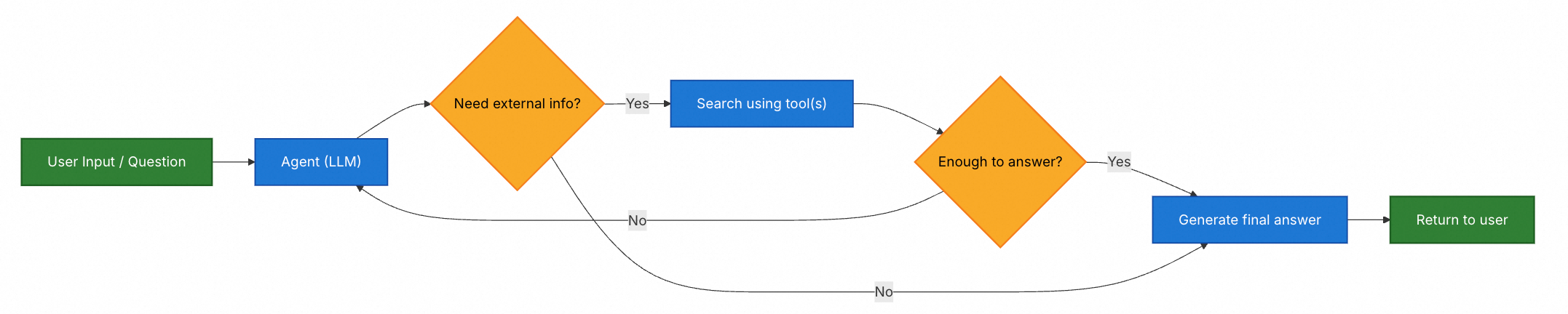
Agentic 检索增强生成(RAG)将检索增强生成的优势与基于 Agent 的推理相结合。Agent(由 LLM 驱动)不是在回答之前检索文档,而是逐步推理并决定在交互过程中何时以及如何检索信息。
提示
Agent 启用 RAG 行为所需的唯一条件是访问一个或多个可以获取外部知识的工具——例如文档加载器、Web API 或数据库查询。
Java 实现示例
import com.alibaba.cloud.ai.graph.agent.ReactAgent;
import org.springframework.ai.document.Document;
import org.springframework.ai.tool.ToolCallback;
import org.springframework.ai.tool.function.FunctionToolCallback;
import org.springframework.ai.vectorstore.VectorStore;
import java.util.List;
import java.util.function.Function;
import java.util.stream.Collectors;

// 创建文档检索工具
class DocumentSearchTool {
  private final VectorStore vectorStore;

  public DocumentSearchTool(VectorStore vectorStore) {
      this.vectorStore = vectorStore;
  }

  public record Request(String query) {}
  public record Response(String content) {}

  public Response search(Request request) {
      // 从向量存储检索相关文档
      List<Document> docs = vectorStore.similaritySearch(request.query());

      // 合并文档内容
      String combinedContent = docs.stream()
          .map(Document::getText)
          .collect(Collectors.joining("

"));

      return new Response(combinedContent);
  }
}

DocumentSearchTool searchTool = new DocumentSearchTool(vectorStore);

// 创建工具回调
ToolCallback searchCallback = FunctionToolCallback.builder("search_documents",
  (Function<DocumentSearchTool.Request, DocumentSearchTool.Response>)
  request -> searchTool.search(request))
  .description("搜索文档以查找相关信息")
  .inputType(DocumentSearchTool.Request.class)
  .build();

// 创建带有检索工具的Agent
ReactAgent ragAgent = ReactAgent.builder()
  .name("rag_agent")
  .model(chatModel)
  .instruction("你是一个智能助手。当需要查找信息时,使用search_documents工具。" +
             "基于检索到的信息回答用户的问题,并引用相关片段。")
  .tools(searchCallback)
  .build();

// Agent会自动决定何时调用检索工具
ragAgent.invoke("Spring AI Alibaba支持哪些向量数据库?");
在这个例子中:
- Agent 接收用户问题
- Agent 推理并决定是否需要检索文档
- 如果需要,Agent 调用 search_documents 工具
- Agent 使用检索到的信息生成答案
- 如果信息不足,Agent 可以再次调用工具
多工具 Agentic RAG
import com.alibaba.cloud.ai.graph.agent.ReactAgent;
import org.springframework.ai.document.Document;
import org.springframework.ai.tool.ToolCallback;
import org.springframework.ai.tool.function.FunctionToolCallback;
import org.springframework.ai.vectorstore.VectorStore;
import java.util.List;
import java.util.function.Function;
import java.util.stream.Collectors;

// 创建多个检索工具
class WebSearchTool {
  public record Request(String query) {}
  public record Response(String content) {}

  public Response search(Request request) {
      return new Response("从网络搜索到的信息: " + request.query());
  }
}

class DatabaseQueryTool {
  public record Request(String query) {}
  public record Response(String content) {}

  public Response query(Request request) {
      return new Response("从数据库查询到的信息: " + request.query());
  }
}

class DocumentSearchTool {
  private final VectorStore vectorStore;

  public DocumentSearchTool(VectorStore vectorStore) {
      this.vectorStore = vectorStore;
  }

  public record Request(String query) {}
  public record Response(String content) {}

  public Response search(Request request) {
      List<Document> docs = vectorStore.similaritySearch(request.query());
      String content = docs.stream()
          .map(Document::getText)
          .collect(Collectors.joining("

"));
      return new Response(content);
  }
}

WebSearchTool webSearchTool = new WebSearchTool();
DatabaseQueryTool dbQueryTool = new DatabaseQueryTool();
DocumentSearchTool docSearchTool = new DocumentSearchTool(vectorStore);

ToolCallback webSearchCallback = FunctionToolCallback.builder("web_search",
  (Function<WebSearchTool.Request, WebSearchTool.Response>)
  req -> webSearchTool.search(req))
  .description("搜索互联网以获取最新信息")
  .inputType(WebSearchTool.Request.class)
  .build();

ToolCallback databaseQueryCallback = FunctionToolCallback.builder("database_query",
  (Function<DatabaseQueryTool.Request, DatabaseQueryTool.Response>)
  req -> dbQueryTool.query(req))
  .description("查询内部数据库")
  .inputType(DatabaseQueryTool.Request.class)
  .build();

ToolCallback documentSearchCallback = FunctionToolCallback.builder("document_search",
  (Function<DocumentSearchTool.Request, DocumentSearchTool.Response>)
  req -> docSearchTool.search(req))
  .description("搜索文档库")
  .inputType(DocumentSearchTool.Request.class)
  .build();

// Agent可以访问多个检索源
ReactAgent multiSourceAgent = ReactAgent.builder()
  .name("multi_source_rag_agent")
  .model(chatModel)
  .instruction("你可以访问多个信息源:" +
             "1. web_search - 用于最新的互联网信息
" +
             "2. database_query - 用于内部数据
" +
             "3. document_search - 用于文档库
" +
             "根据问题选择最合适的工具。")
  .tools(webSearchCallback, databaseQueryCallback, documentSearchCallback)
  .build();

multiSourceAgent.invoke("比较我们的产品文档中的功能和最新的市场趋势");
本文整理自 Spring AI Alibaba 官方文档《检索增强生成 RAG》:https://java2ai.com/docs/frameworks/agent-framework/advanced/rag